Hardware_software_interfaces
read more
Introduction
The Hardware/ Software Interface Class
Course text book: Computer Systems
The Big Theme
- The hardware/ software interface
- How does the h/w(0s and 1s, processor executing instructions) relate to the s/w (Go programs)?
- Computing is about abstractions (but we can’t forget reality)
- What are the abstractions that we use?
- What do YOU need to know about them?
- When do they break down and you have to peek under the hood?
- What bugs can they cause and how do you find them?
- Become a better programmer and begin to understand the important concepts that have evolved in building ever more complex computer systems.
Roadmap
- Memory and data
- Integers and floats
- Machine code and C
- x86 assembly
- Procedures and stacks
- Arrays and structs
- Memory and caches
- Processes
- Virtual memory
- Memory allocation
- Java/Go vs C
Little theme 1: Representation
- All digital systems represnt everything as 0s and 1s
- The o and 1 are really two different voltage ranges in the electronics
- Everything includes:
- Numbers - integers and floating point
- Character - the building blocks of strings
- Instructions - the directives to the CPU that make up a program
- Pointers - addresses of data objects stored away in memory
- These encodings are stored throughout a computer system
- In registers, caches, memories, disks, etc
- They all need addresses
- A way to find them
- Find a new place to put a new item
- Reclain the place in memory when data no longer needed
Little theme 2: Translation
- There is a big gap between how we thing about programs and data and the 0s and 1s of computers
- Need languages to describe what we mean
- Languages need to be translated one step at a time
- Word-by-word
- Phrase structure
- Grammar
- We know Java/Go as a programming language
- Have to work our way down to the 0s and 1s of computers
- Try not to lose anything in translation!
- We’ll encounter Java/Go byte-code, C language, assembly language, and machine code (for the X86 family of CPU architectues)
Little theme 3: Control flow
- How do computers orchestrate the many things they are doing - seemingly in parallel
- What do we have to keep track of when we call a method, and then another, and then another, and so on
- How do we know what to do upon “return”
- How do we run multiple user programs and let them share a sigle computer and memory
Hardware_software_interfaces
read more
Architecture
Basics of architecture, machine programming
- What is an ISA (Instruction Set Architecture)?
- History of Intel processors and architectures
- C, assembly, machine code
- x86 basics: registers
Translation Impacts Performance
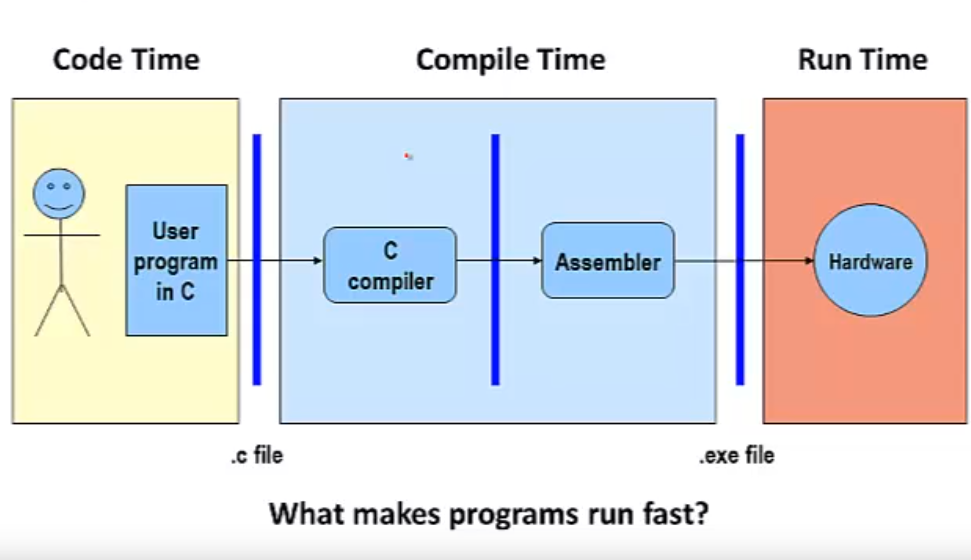
Program lifetime illustration
- The time required to execute a program depends on:
- The program.
- The compiler: what set of assember instructions it translates the program into.
- The instruction set architecture (ISA): what set of instructions it makes available to the compiler.
- The hardware implementation: how much time it takes to execute an instruction.
Instruction Set Architectures
- The ISA defines:
- The system’s state (e.g. registers, memory, program counter)
- The instructions the CPU can execute
- The effect that each of these instructions will have on the system state
General ISA Design Decisions
- Instructions
- What instructions are available? What do they do?
- How are they encoded? (eg 32bits, 64bits)
- Registers
- How many registers are there?
- How wide are they?
- Memory(addressing modes)
- How do you specify a memory location?
x86
- Processors that implement the x86 ISA completely dominate the server, desktop and laptop markets
- Evolutionary design
- Backwards compatibility up until 8086, introduced in 1978
- Added more features as time goes on
- Complex instruction set computer (CISC)
- Many different instructions with many different formats
- But, only small subset encountered with Linux programs
- (as opposed to Reduced Instruction Set Computers (RISC), which use simpler instructions)
- Many different instructions with many different formats
Intel x86 Evolution: Milestones
| Name | Date | Transistors | MHz |
|---|---|---|---|
| 8086 | 1978 | 29k | 5-10 |
- First 16-bit processor. Basis for IBM PC & DOS
- 1MB address space
| Name | Date | Transistors | MHz |
|---|---|---|---|
| 386 | 1985 | 275k | 16-33 |
- First 32 bit processor, referred to as IA32
- Added “flat addressing”
- Capable of running Unix
- 32-bit Linux/gcc targets i386 by default
| Name | Date | Transistors | MHz |
|---|---|---|---|
| Pentium 4F | 2005 | 230M | 2800-3800 |
- First 64-bit Intel x86 processor, referred to as x86-64
Intel x86 Processors
| Machine Evolution | |
|---|---|
| 486 | 1989 |
| Pentium | 1993 |
| Pentium/MMX | 1997 |
| PentiumPro | 1995 |
| Pentium III | 1999 |
| Pentium 4 | 2001 |
| Core 2 Duo | 2006 |
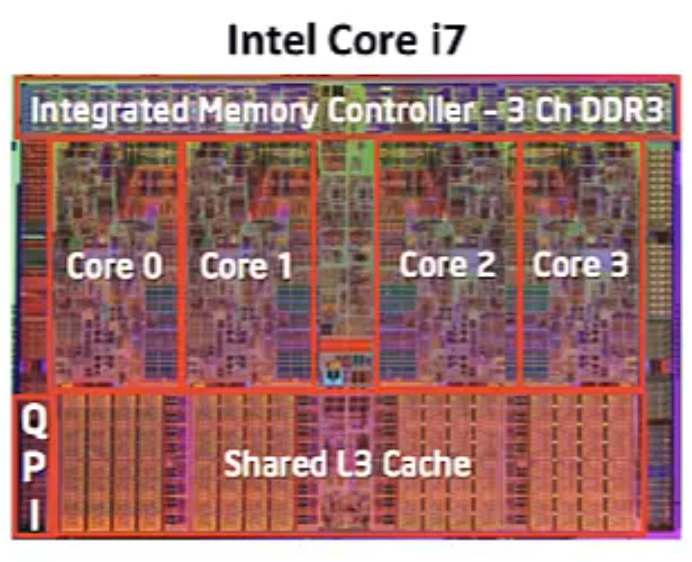
| Core i7 | 2008 |
Hardware_software_interfaces
read more
Numbers
Integer & Floating Point Numbers
-
Representation of integers: unsigned and signed
-
Unsigned and signed integers in C
-
Arithmetic and shifting
-
Sign extension
-
Background: fractional binary numbers
-
IEEE floating-point standard
-
Floating-point operations and rounding
-
Floating-point in C
Encoding
- How about encoding a standard deck of playing cards?
- 52 cards in 4 suits
- How do we encode suits, face cards?
- What operations do we want to make easy to implement?
- Which is the higher value card?
- Are they the same suit?
Two possible representation
Hardware_software_interfaces
read more
Memory
Memory, Data, and Addressing
Preliminaries
- Preliminaries
- Prepresenting information as bits and bytes
- Organizing and addressing data in memory
- Manipulating data in memory using C
- Boolean algebra and bit-level manipulations
Hardware: Logical View

Hardware: Semi-Logical View

Intel* P45 Express Chipset Block Diagram
Hardware: Physical View

CPU “Memory”: Registers and Instruction Cache

- There are a fixed number of registers in the CPU
- Registers hold data
- There is an I-cache in the CPU that holds recently fetched instructions
- If you execute a loop that fits in the cache, the CPU goes to memory for those instructions only once, then executes them out of its cache
Performance: It’s Not Just CPU Speed
- Data and instructions reside in memory
- To execute an instruction, it must be fetched into the CPU
- Next, the data on the which the instruction operates must be fetched from memory and brought to the CPU
- CPU <–> Memory bandwidth can limit performance
- Improving performance 1: hardware improvements to increase memory bandwidth (e.g., DDR2 -> DDR3 -> DDR4)
- Improving performance 2: move less data into/ out of the CPU
- Put some “memory” in the CPU chip itself (this is “cache” memory)
Binary Representations
- Base 2 number representation
- Represent $351_{10}$ as $0000000101011111_2$ or $101011111_2$
- Electronic implementation
- Easy to store with bi-stable elements
- Reliably transmitted on noisy and inaccurate wires
Representing information as bits and bytes
Encoding Byte Values
- Binary: $00000000_2$ – $11111111_2$
- Byte = 8 bits (binary digits)
- Example: $00101011_2$ = $32 + 8 + 2 + 1$ = $43_{10}$
- Example: $26_{10} = 16 + 8 + 2 = 00101010_2$
- Decimal: $0_{10}$ – $255_{10}$
- Hexadecimal: $00_{16}$ – $FF_{16}$
- Groups of 4 binary digits
- Byte = 2 hexadecimal (hex) or base 16 digits
- Base-16 number representation
- Use characters ‘0’ to ‘9’ and ‘A’ to ‘F’ to represent
- Write $FA1D37B_{16}$ in C code as a 4-byte value: $0XFA1D37B$ or $0xfald37b$
| Hex | Decimal | Binary |
|---|---|---|
| 0 | 0 | 0000 |
| 1 | 1 | 0001 |
| 2 | 2 | 0010 |
| 3 | 3 | 0011 |
| 4 | 4 | 0100 |
| 5 | 5 | 0101 |
| 6 | 6 | 0110 |
| 7 | 7 | 0111 |
| 8 | 8 | 1000 |
| 9 | 9 | 1001 |
| A | 10 | 1010 |
| B | 11 | 1011 |
| C | 12 | 1100 |
| D | 13 | 1101 |
| E | 14 | 1110 |
| F | 15 | 1111 |
How is memory organized?
Hardware_software_interfaces
read more
x86 Assembly
Assembly Programming
- Move instructions, registers, and operands
- Memory addressing modes
- swap example: 32-bit vs 64-bit
- Arithmetic operations
- Condition codes
- Conditional and unconditional branches
- Loops
- Switch statements
Three Basic Kinds of Instructions
- Transfer data between memory and register
Loaddata from memory into register%reg = Mem[address]
Storeregister data into memoryMem[address] = %reg
Memory is indexed just like an array[]
- Perform arithmetic function on register or memory data
c = a + b;
- Transfer control
- Unconditional jumps to/ from procedures
- Conditional branches
Moving Data: IA32
- IA32 has 8 registers. 6 are general purpose and 2 special purpose(the last 2)
| Register | Size(32-bit) | Usage (mostly obsolete) |
|---|---|---|
| %eax | 32 | Accumulator for operands and results data |
| %ecx | 32 | Counter for string and loop operations |
| %edx | 32 | I/O pointer |
| %ebx | 32 | Pointer to data in the data segment |
| %esi | 32 | Source pointer for string operations |
| %edi | 32 | Destination pointer for string operations |
| %esp | 32 | Stack pointer |
| %ebp | 32 | Pointer to the base of the current stack frame |
- Moving Data
-
movx Source, Dest
-
Hardware_software_interfaces
read more
Procedures
Procedures & Stacks
- Stacks in memory and stack operations
- The stack used to keep trach of procedure calls
- Return addresses and return values
- Stack-based languages
- The Linux stack frame
- Passing arguments on the stack
- Allocating local variables on the stack
- Register-saving conventions
- Procedures and stacks on x64 architecture
Memory Layout
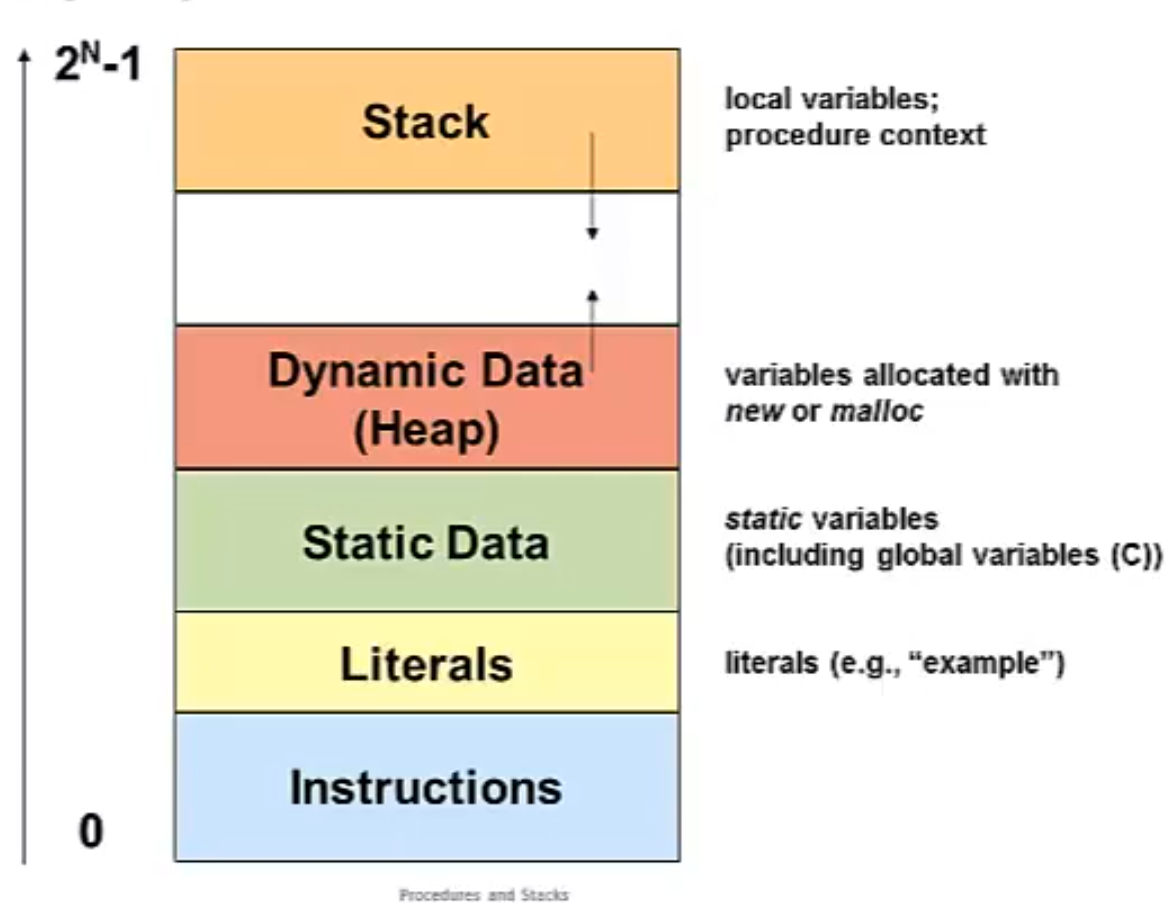
| Memory Permissions | Segment / Region | Management / Initialization |
|---|---|---|
| Writable; not executable | Stack | Managed automatically (by compiler/runtime) |
| Writable; not executable | Dynamic Data (Heap) | Managed by programmer |
| Writable; not executable | Static Data | Initialized when process starts |
| Read-only; not executable | Literals | Initialized when process starts |
| Read-only; executable | Instructions (Code) | Initialized when process starts |
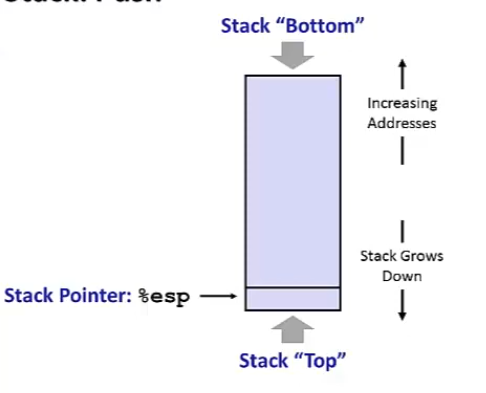
IA32 Call Stack
- Region of memory managed with a stack “discipline”
- Grows towards lower addresses
- Customarily shown “upside-down”
- Register
%espcontains lowest stack address = address of “top” element
Hardware_software_interfaces
read more
Memory Allocation
Memory Allocation
- Dynamic memory allocation
- Size/ number of data stuctures may only be known at run time
- Need to allocate space on the heap
- Need to de-allocate (free) unused memory so it can be re-allocated
- Implementation
- Implicit free lists
- Explicit free lists
- Sefregated free lists
- Garbage collection
- Commobly memory-related bugs in C programs